AI TOOL / #03007
Design My Room
Let AI-generated designs help you redesign your room in just a few seconds.
Introduction
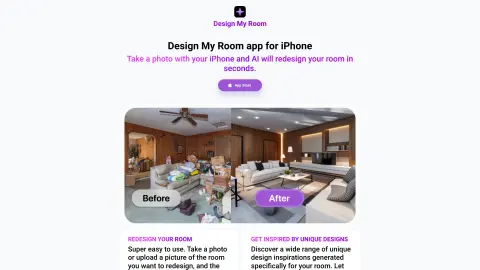
Redesign your room in seconds with AI-generated designs from a single photo.
What is “Design My Room”?
The “Design My Room” app allows you to completely redesign your room in just a few seconds, all by taking a single photo. Simply take a picture of your room, and the iPhone app will provide you with 5 different design options. It’s extremely easy to use: just take a photo or upload an image of the room you want to redesign, and the app will generate 5 unique design ideas. Discover a range of creative designs specifically tailored for your room – let this app inspire your home renovation project!
How to use Design My Room?
Use your iPhone to take photos of the room, or upload existing images. The app will generate five different design ideas for your room.
The core functions of Design My Room
Redesigned rooms powered by AI
For each photo, 5 different design options are generated.
Easy photo upload
Unique design inspiration
Related
Humanize AI
An AI-based tool that transforms AI-generated text into content that resembles human-written work and is free from plagiarism.
AI Bypasser AI
An AI detection removal tool for rewriting AI text and bypassing AI detection.
CAPTCHA Solver: auto hCAPTCHA reCAPTCHA freely
Chrome extension that automatically solves hCaptcha and reCAPTCHA challenges.
NopeCHA
Automated CAPTCHA solutions powered by AI allow you to bypass CAPTCHAs quickly and reliably.
Reality Check
Verifies the authenticity of images in a real-time manner, distinguishing between genuine photographs and those generated by AI.
Priz Guru
A comprehensive engineering thinking platform for systematic problem-solving and innovation.