AI TOOL / #07222
ReadImage
Extract, edit, and copy text from images on web pages.
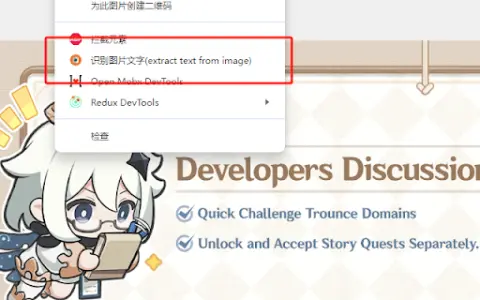
Introduction
Extracts, edits, and copies text from images on web pages.
What is Image Text Extractor ai chrome extension/plugin?
This extension allows users to extract text from images displayed on web pages. It supports common image formats such as jpg, jpeg, png and bmp. After extraction, the text can be edited and copied.
How to use Image Text Extractor ai chrome extension/plugin?
Hover your mouse over the image, right-click and select "Extract text from image". Press "Ctrl + Q" to view the extracted text on the extension page, where it can be edited and copied.
Image Text Extractor ai chrome extension/plugin core features
Extract text from images on web pages
Edit extracted text
Copy extracted text
Related
Jev
An AI model that enables structured decision-making for software development
Dropstone CLI
Remember to use the corrected terminal programming agent.
PixoLet: Upload Images in Seconds
Generate E-commerce Images for Free with GPT-Image 2.5
Ayven
An AI-based coordination agent that helps teams track progress and assign tasks efficiently.
Capafy AI
An intelligent agent market where agents can be both operated online and sold.
GitGlow
A visual Git tool for reviewing the changes made by AI agents