AI TOOL / #06951
AutoLatex
A browser extension that makes it easy to generate LaTeX formulas using LLMs.
Introduction
Browser extension for easy LaTeX equation generation using LLMs.
What is the AutoLatex AI Chrome extension/plugin?
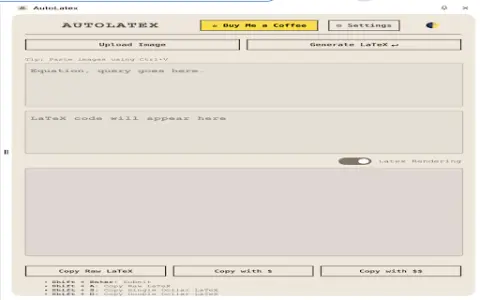
AutoLatex is a browser extension designed to simplify LaTeX formula generation for researchers and students. It uses large language models (LLMs) to convert natural language and images into Markdown and LaTeX, providing live editing for instant rendering. The tool offers customizable settings, keyboard shortcuts, and privacy controls through user-managed API keys. By simplifying the process of integrating complex formulas into documents, AutoLatex boosts productivity in academic and research workflows, especially in the field of deep learning. By disabling LaTeX rendering, it can also be used as an LLM assistant in the sidebar.
How do I use the AutoLatex AI Chrome extension/plugin?
Use the input area to enter natural language or paste an image. AutoLatex converts these inputs into LaTeX and Markdown in real time and displays the rendered result. You can customize settings, manage API keys, and use keyboard shortcuts to improve efficiency.
Core features of the AutoLatex AI Chrome extension/plugin
Convert natural language or image input into LaTeX formulas and Markdown.
Real-time rendering of LaTeX formulas and Markdown
You can switch to standalone chat mode by disabling LaTeX rendering.
Related
Lusongsong
Lu Songsong's blog provides cutting-edge knowledge in the field of online promotion, offering comprehensive articles on online marketing, website optimization, and entrepreneurial stories for grassroots webmasters and entrepreneurs. Here, you can discover numerous grassroots internet entrepreneurship projects as well as the latest news in the world of internet startups. It is an excellent resource for those looking for inspiration and ideas for starting their own businesses.
Pass by the photo album.
Pass by TuChang – a completely free public image hosting service with global CDN acceleration, support for external links, and the ability to save original images. Each image can exceed a size of 10 MB!
China Blue TV
The official website of China Blue TV and Zhejiang Satellite TV allows users to watch all the channels of Zhejiang Satellite TV for free both on mobile devices and computers. The content is provided in high definition, and playback is also supported!
Compression of tiny PNG images
Tiny PNG is an intelligent online tool for compressing WEBP, PNG, and JPEG images. It utilizes advanced lossy compression techniques to reduce the size of these file formats. By selectively reducing the number of colors in an image, it minimizes the amount of data needed for storage.
PDF Online Toolkit
A free and easy-to-use online PDF tool that offers a total of 24 features for editing PDF files directly online.
Ma Xiaobang's Blog
Ma Xiaobang’s Blog is a personal website dedicated to sharing internet-related experiences. The blogger uses easy-to-understand articles to introduce a wide range of high-quality software and online tutorials to everyone. (Ma Xiaobang: Of course, I should give myself some praise!) Scan the QR code to follow its WeChat official account.