AI TOOL / #06738
Chat GPT Logger
An extension tool used to save ChatGPT conversations as local text files.
Introduction
Extension to save ChatGPT conversations to a local text file.
What is the GPT Chat Logger AI Chrome extension/plug-in?
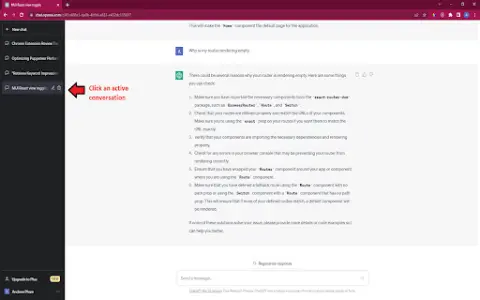
The GPT Chat Recorder is an extension that allows you to save active conversations from Chat GPT as text files on your computer. All you need to do is click on an ongoing conversation, then click the save icon, and finally save the file to your device. These steps are also illustrated in the image provided.
How to use the GPT Chat Logger AI Chrome extension/plug-in?
Click on an active conversation within ChatGPT, select the save icon, and then save the file to your computer.
The core functionality of the GPT Chat Logger AI Chrome extension/plug-in
Save the ChatGPT conversation as a local text file.
Related
SEEYOU – the Smart Recorder & Virtual Library
Artificial intelligence tool for perfect memory of meetings, lectures and live sessions.
Vexa
An artificial intelligence platform used for recording, transcribing, and summarizing video calls.
AI Meeting Tool
AI-based meeting tools automatically schedule meetings, process payments, and provide AI-powered meeting assistance.
Wavve AI
An artificial intelligence platform used for audio recording, transcription, summarization, and content generation.
JotPsych
A Chrome extension designed for JotPsych, which allows the recording of interactions between providers and patients, including remote medical consultations.
YBL Connect
The Google Meet plugin is used for recording, transcribing, and summarizing meetings.