AI TOOL / #06524
Speak based on Azure Speech
Text-to-speech extension using Azure Speech with support for multiple languages and Chrome live subtitles.
Introduction
Text-to-speech extension using Azure Speech, supports many languages and Chrome Live Caption.
What is Azure Speech TTS Extension ai chrome extension/plugin?
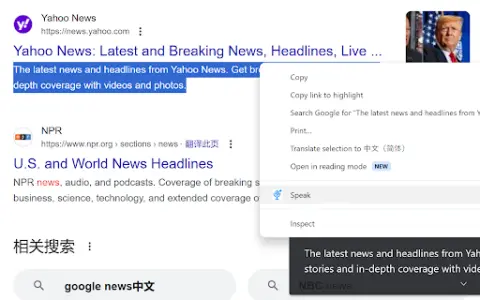
This is a text-to-speech (TTS) extension that leverages the Azure Speech service to convert selected text to audio. It supports multiple languages and integrates with Chrome's Live Subtitles feature for enhanced accessibility. Users need to configure the extension using their Azure Speech Service API key to enable TTS functionality.
How to use Azure Speech TTS Extension ai chrome extension/plugin?
Install the extension, configure it with your Azure Speech Service API key, select text on a web page, and use the extension to play audio for the selected text. Audio playback will be based on the selected language and voice settings.
Core features of Azure Speech TTS Extension ai chrome extension/plugin
Text-to-speech using Azure Speech Service
Support multiple languages
Integrate with Chrome Live Subtitles
Configurable voice settings
Related
Vatis Tech
An AI-based speech-to-text infrastructure that includes transcription software and APIs.
Ssemble
AI tools automatically create engaging short videos from long videos.
Contentfries
Value-added content applications that use AI for video remastering and subtitle generation.
dojo clip video editing
An AI video editor designed for editing and trimming videos, adding subtitles, and creating creative content.
BlipCut AI Video Translator
An AI-powered video translation tool that supports over 130 languages and features simultaneous lip-syncing as well as voice cloning capabilities.
Hidden Door
Popular! Fiction Generation Online Social Role Playing Game