AI TOOL / #05985
Voiceboost – ChatGPT
A Chrome extension designed for voice-controlled interaction with ChatGPT.
Introduction
Chrome extension for voice-controlled ChatGPT interaction.
What is the Voiceboost AI Chrome extension/plug-in?
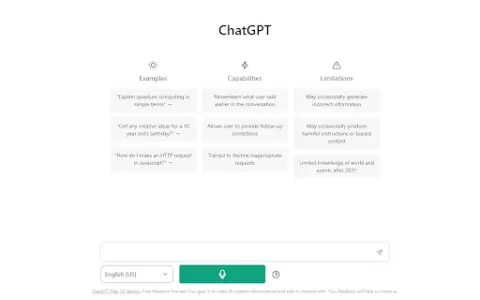
Voiceboost is a Chrome extension that allows users to interact with ChatGPT via voice commands. It adds a button below the input field; by clicking this button, the system captures the user’s verbal inquiries and sends them to ChatGPT for responses. This provides a hands-free alternative for entering text.
How to use the Voiceboost AI Chrome extension/plug-in?
Click the button added below the input area to start recording your voice input. Alternatively, use the keyboard shortcuts: Ctrl+Shift+S (Windows) or Command+Shift+S (Mac) to begin recording, and Ctrl+Shift+E (Windows) or Command+Shift+E (Mac) to stop and submit the recording. Make sure to grant microphone access when prompted.
The core functionality of the Voiceboost AI Chrome extension/plugin
Voice input for ChatGPT
Keyboard shortcuts for voice capture and submission
Related
Mesh
An AI-powered accounting assistant designed for automatic bookkeeping and real-time financial analysis.
Digits — Accounting, reimagined.
An AI-powered accounting platform designed for startups and small businesses.
impact.com for Chrome
A Chrome extension designed to simplify the management of partnerships between publishers, creators, and brands.
PixPoc
An AI content creation platform that allows users to create personalized photos, videos, and content inspired by popular AI-generated celebrities.
Storytide.io – Corporate Influencing
An all-in-one LinkedIn workspace designed for business influencers and managers.
Favikon Chrome extension
An AI-powered Chrome extension designed for analyzing social media influencers and tracking trends.