AI TOOL / #04208
Shift-Ctrl-F: Semantic Search for the Browser
A Chrome extension that uses MobileBERT to search for and highlight answers on web pages.
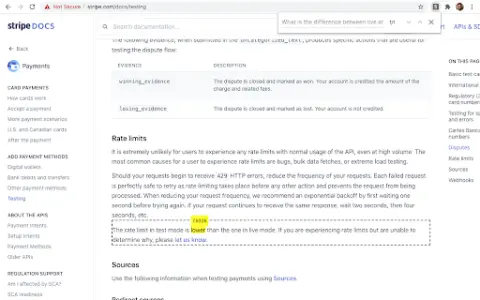
Introduction
Chrome extension using MobileBERT to search and highlight answers on webpages.
What is the Shift-Ctrl-F Chrome extension/plugin?
Shift-Ctrl-F is a Chrome extension that utilizes the MobileBERT model, which has been fine-tuned using the SQuAD dataset. This extension uses TensorFlowJS to search for answers on web pages and identify relevant elements. It allows users to enter natural-language queries and find corresponding answers within the content of the current page.
How to use the Shift-Ctrl-F Chrome extension/plugin?
1) Open the extension pop-up window using the toolbar or shortcut key (Shift-Ctrl-F).
2) Enter your natural language query in the search box.
3) Press Enter and wait for the model to return the results.
The core functionality of the Shift-Ctrl-F Chrome extension/plug-in.
Conduct natural language question-and-answer interactions on web pages.
Highlight relevant elements based on the search query.
Efficient processing using MobileBERT
Related
knowt.com
Knowt is a free Quizlet alternative with artificial intelligence learning tools and millions of resources.
Dropscale
An e-commerce tool that uses TikTok ads for tracking and automatically identifies best-selling products.
Savage Coach
The first chatbot based on Greg Savage's teaching content, connected directly to your Savage Academy account.
ods.ai
A community website for data science, artificial intelligence and machine learning enthusiasts.
getresponse.fr
Marketing software used for email marketing, automation, and generating revenue from content.
sketchar.io
An augmented reality painting application designed for artistic creation and learning, equipped with an AR assistant and a digital canvas.