AI TOOL / #04192
AI Added to Search
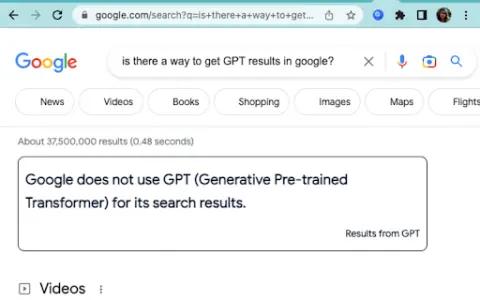
Add the AI answer at the top of the search results.
Introduction
Adds an AI answer to the top of search results.
What is an AI Search Extension – an extension/plug-in for Chrome?
This extension enhances your search experience by adding AI-generated answers at the top of the search results. It allows you to quickly obtain a summary of your query or a direct answer, without having to browse through multiple search results. You can choose to have AI-generated answers appear automatically with each search, or only when you click on the extension icon.
How to use the AI Search Extension for Chrome? How to install and use this extension/plug-in?
Install the extension. You can choose to have AI answers appear automatically, or only when you click on the extension icon. Once it is installed and you perform a search, AI answers will be displayed at the top of the results page.
The core functionality of the AI Search Extension for Chrome.
AI-driven generation of search query answers
Switch between automatic and on-demand AI answers.
Integration with existing search engines
Related
OCR Editor – Text from Image
Image-to-text converters that utilize OCR technology extract text from various image formats.
Supertranslate
An AI platform that automatically generates subtitles, converts speech into text, and performs translations.
CANVID for Windows
Screen recording tool with auto-enhancement to easily create professional videos.
Zubtitle
An AI-powered online video editor offering subtitles, resizing, cropping, and social media optimization.
Image to Text (Using AI)
A browser extension that uses AI to generate descriptions for images.
Voicebiometric
Voicebiometric enables real-time subtitles and speaker recognition for live demonstrations.