AI TOOL / #04085
SEOfor.AI
A platform that tracks how artificial intelligence influences the responses provided by brands, individuals, and products.
Introduction
Platform to track AI answers about brands, people, and products.
What is Track AI Answers?
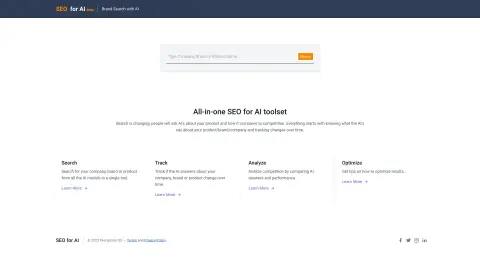
Track AI Answers is a platform designed to monitor the perspectives of large language models (LLMs) and artificial intelligence chatbots regarding specific brands, companies, products, individuals, and popular lists. It enables users to keep track of answers generated by artificial intelligence systems and receive notifications whenever those answers change. This helps users stay prepared for the evolving trends in search behavior and optimize their SEO strategies when utilizing artificial intelligence technologies.
How to use Track AI Answers?
Users can search for brands, companies, products, individuals, or popular lists on the website. After conducting a search, they can register their email address on the search results page to track the responses provided by artificial intelligence and receive notifications regarding any updates or changes.
The core functionality of Track AI Answers
Track artificial intelligence responses related to brands, companies, and products.
Track the artificial intelligence responses related to a specific individual.
Track popular lists and recommendations related to artificial intelligence models.
Receive notifications whenever there are changes in the answers provided by artificial intelligence.
Related
Zhispu Qingyan
Zhipu Qingyan is a bilingual AI assistant that supports both Chinese and English dialogue. It is developed by Beijing Zhipu Huazhang Technology Co., Ltd. and is based on the independently developed ChatGLM2 model (part of the GLM series of large-scale models). Currently, all users can use the GLM-4 model for free. This AI assistant has been trained using a vast amount of text data – encompassing trillions of characters in total.
GitHub mirror site
As we all know, most users in China cannot access GitHub directly. In addition to using an accelerator, we can also use mirror sites to access GitHub! Here are several common GitHub mirror sites to share with you! Last updated: December 18, 2024, 23:
Tupin Office
Tupind Office Network is a navigation website designed specifically for professionals, offering office software, practical skills, and valuable career resources. It brings together all the essential knowledge related to office work from across the internet, helping to enhance the efficiency and learning abilities of working people. The website includes all the tools and software we commonly use in our daily office work – and they are all completely free to use.
ID Photo Generator
ID Photo Generator is a free ID photo creation tool launched by Tencent QQ Browser. You only need to upload a personal selfie, and it will generate a high-quality ID photo for you with one click. It supports multiple sizes and can meet your needs for marriage registration photos, visa photos, and various application ID photos. I just found it randomly online.
Gao Ding AI Design Studio
GaoDing AI Design is a one-stop design tool powered by AI, developed by GaoDing Design. It includes features such as AI-generated illustrations, AI-assisted design, AI-based copywriting, and more! With AI Illustrations, you can bring your ideas to life quickly – just one image or one sentence is enough. AI Design allows for the rapid creation and integration of various elements in seconds. And AI Copywriting helps you transform your concepts into tangible content effortlessly.
Sordum
sordum.or is a website dedicated to developing small Windows system optimization tools. It has released over a hundred portable Windows system optimization utilities, all available for free download. The website is entirely in English; the screenshot below shows the translated page. &nb