AI TOOL / #04050
AI Roundtable
Ask a question and receive answers from multiple AI assistants.
Introduction
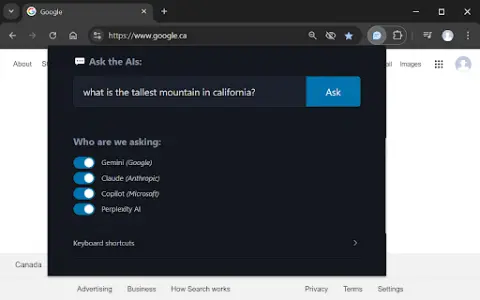
Ask one question, get answers from multiple AI assistants.
What is a Multiple AI Assistants Chrome extension/plug-in?
This website allows users to submit questions at once and receive answers from multiple AI assistants. Users can customize which assistant they want to use for their queries. The website also provides keyboard shortcuts, making it easy to access various functions quickly.
How to use the Multiple AI Assistants Chrome extension?
Use the shortcut keys Ctrl/Cmd + Shift + Q to open the query window and start typing your question. Use Alt + 1 to switch to Gemini, Alt + 2 to switch to Claude, Alt + 3 to switch to Copilot, and Alt + 4 to switch to ChatGPT.
The core functions of various AI Assistant extensions/plugins for Chrome.
Query multiple AI assistants simultaneously
It is possible to customize the selection of AI assistants.
Convenient and fast keyboard shortcuts
Related
PageMaster
An AI-powered one-click web page summary tool.
One Paragraph
A Chrome extension that uses ChatGPT to generate summaries in real-time.
myGPTBrain
Simplify the process of acquiring knowledge through instant responses and document summaries.
Cognizer Genius
An AI assistant designed for professionals, capable of providing immediate answers to the questions contained in your content.
AIAssist
AI browser extension for instant answers and enhanced online research.
Simplifly
Chrome extension for automatically summarizing news articles via NLP and PageRank technology.